Cette page n'est pas encore traduite — texte anglais affiché.
Download

The register and Plus — by a direct link

Our apps are not on Google Play — that is how we keep the subscription inexpensive. The register goes on an Android tablet, Plus on the owner’s phone. Both take a minute: open the link or point the camera at the QR code.

  • The apps are free — you pay only for the service subscription
  • Install once: the software updates itself
  • No app store and no Google account needed
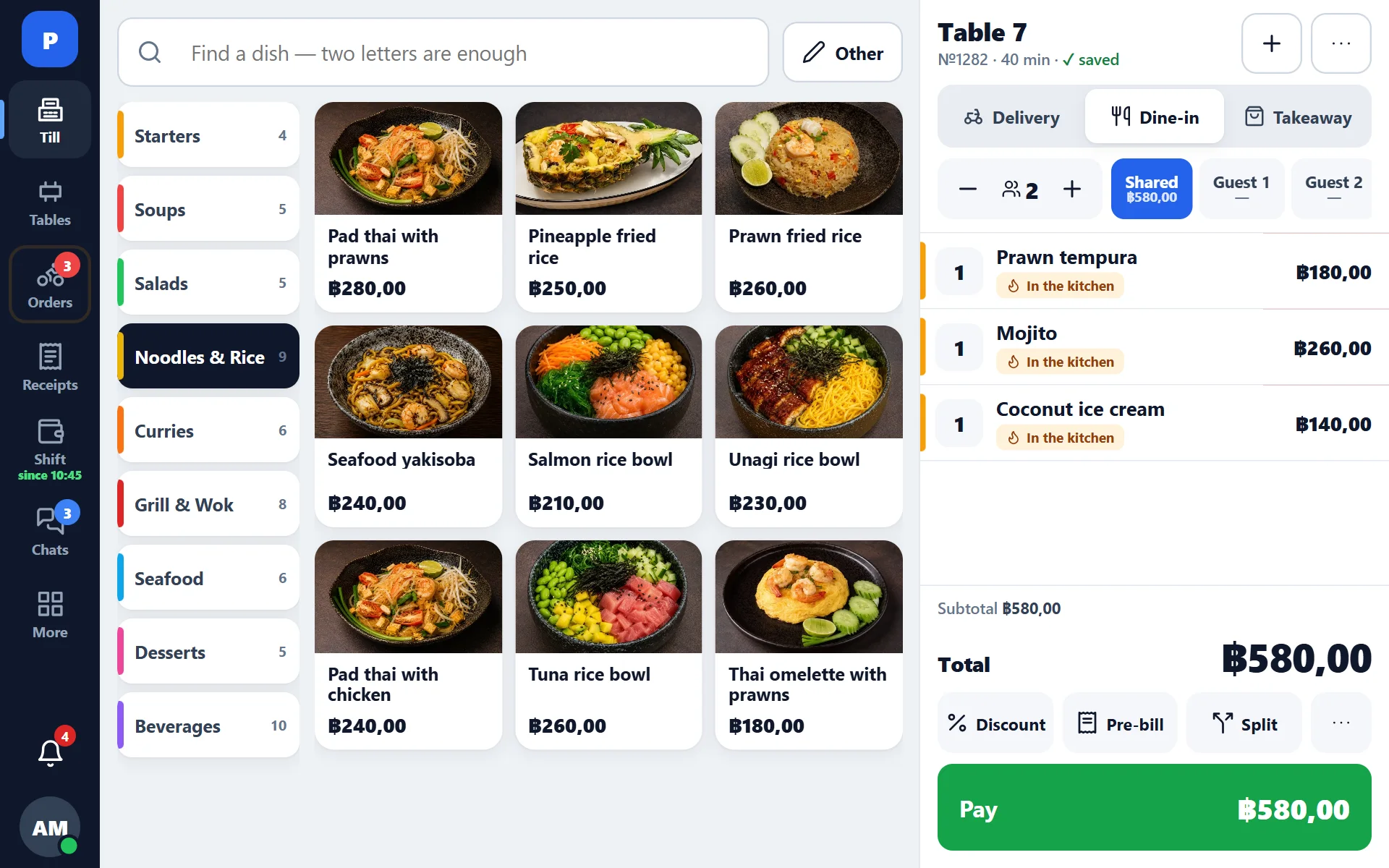
Register: the order for table 7 and menu tiles with dish photos

Pick the app

The code opens the download page with a big “Download” button. The link under the button can be sent in a messenger when there is nothing to scan with.

🖥

Register

Android tablet · Android 8 or newer

Orders and tables, payment, shifts, receipt and kitchen ticket printing. Installed on every tablet on the floor; staff sign in with a PIN.

QR code of the register download page
Point the tablet camera
Open the download page get.pro-positive.com/

Without printing, the register also works in a browser — on an iPad, for example: open the register in a browser.

✚

Plus

Phone · Android 7 or newer

Revenue, receipts, shifts, staff, the kitchen and chats of the whole group — on the owner’s and manager’s phone. Sign in with the back-office login and password.

QR code of the Plus download page
Point the phone camera
Open the download page get.pro-positive.com/plus

On an iPhone, Plus works in Safari: open Plus and add it to the Home Screen — the icon looks like an app.

Why we are not on Google Play

An app store is not just a shop window. It is a commission, its own payment rules and a review queue for every update. We distribute the apps ourselves, and for you that means a cheaper subscription, fixes the same day and not a single extra step.

💸

A cheaper subscription

The store takes a share of subscriptions sold through it — 15% on Google Play. We take payment directly, with no middleman, and that share is not in our price: the register is ฿249 a month.

🧰

No extra overhead

Publishing in a store means separate builds, questionnaires and mandatory rework for the store’s new requirements every year. That is time and money that would otherwise end up in your subscription. We spend it on the register.

⚡

Fixes the same day

A store update waits for review first — from a few hours to a few days. Our software lives on the server and updates itself: a fix reaches the register the same day, with no reinstall.

🔒

Just as safe

The app is signed with our key and downloaded over a secure connection. Android checks the signature on every update: a file signed by someone else will not install over ours.

🔔

One question from Android

On the first install Android asks whether apps from this source may be installed. It is the usual warning for anything outside the store — allow it once.

🔄

Install once

The app is a thin shell: the register and Plus live on the server. The file is rarely reinstalled, and the register shows an “Update the app” button itself when it is needed.

Install in a minute

  1. 1

    Open the download page

    Point the camera at the QR code above or open the link in Chrome: on the tablet for the register, on the phone for Plus.

  2. 2

    Download the file

    Press the big “Download” button — the file appears in your downloads.

  3. 3

    Allow the install

    Android asks for permission to install apps from this source — allow it. Only once.

  4. 4

    Install and sign in

    The register — with a staff PIN; Plus — with the back-office login and password.

Installation questions

I press “Download” and nothing happens

Open the page in Chrome, not inside a messenger: the built-in browsers of Telegram, LINE and WhatsApp often block file downloads silently.

Is it safe to install an app from outside the store?

Yes. The file is signed with our key and downloaded over HTTPS from our address. Android checks the signature on every update: a tampered file will not install over ours.

How do I update?

Nothing to do: new versions of the software load automatically. If a new shell is ever needed, the register shows an “Update the app” button.

Is there a version for iPhone and iPad?

Plus works on an iPhone in Safari and goes on the Home Screen as an icon. The register works on an iPad in a browser, but without printing: a browser cannot print to network printers. A floor with printers needs an Android tablet.

Where do I get the link when this page is not at hand?

In the back office: “Settings → POS”, the “Installing the till on a tablet” card — the same link and QR code are there.

Will you be on Google Play?

Not for now: a direct link gives customers a cheaper subscription and same-day fixes. If your group needs the store — write to us.

Set up the register today

The account opens in a minute: 14 days free, no card required.