Clients & orders CRM: from the client’s message to the handed-over order
A client writes on Instagram, LINE or Telegram — you open a request, build an offer from your menu and send them a text with a deposit link. Once they agree, the request becomes a dated order. If you deliver every week, it is a regular order: the list for each day builds itself. Revenue is counted by the receipt at hand-over.
- Requests, dated orders, regular orders, clients, “To cook” and “Purchasing” — tabs of one module
- “Orders by day” for the next two weeks: see which days the kitchen is already busy
- Regular deliveries: office lunches on weekdays, a cake every Friday, flowers for Monday, meal plans
Who it is for
Bakery
A cake for Saturday: a request from Instagram, a photo of what the client wants, the inscription, a deposit. And the café that takes a cake from you every Friday is a regular order.
Restaurant
Dinner for 12 in five days, a banquet, holiday pre-orders. “Orders by day” shows which days are already taken and which are free.
Office lunches
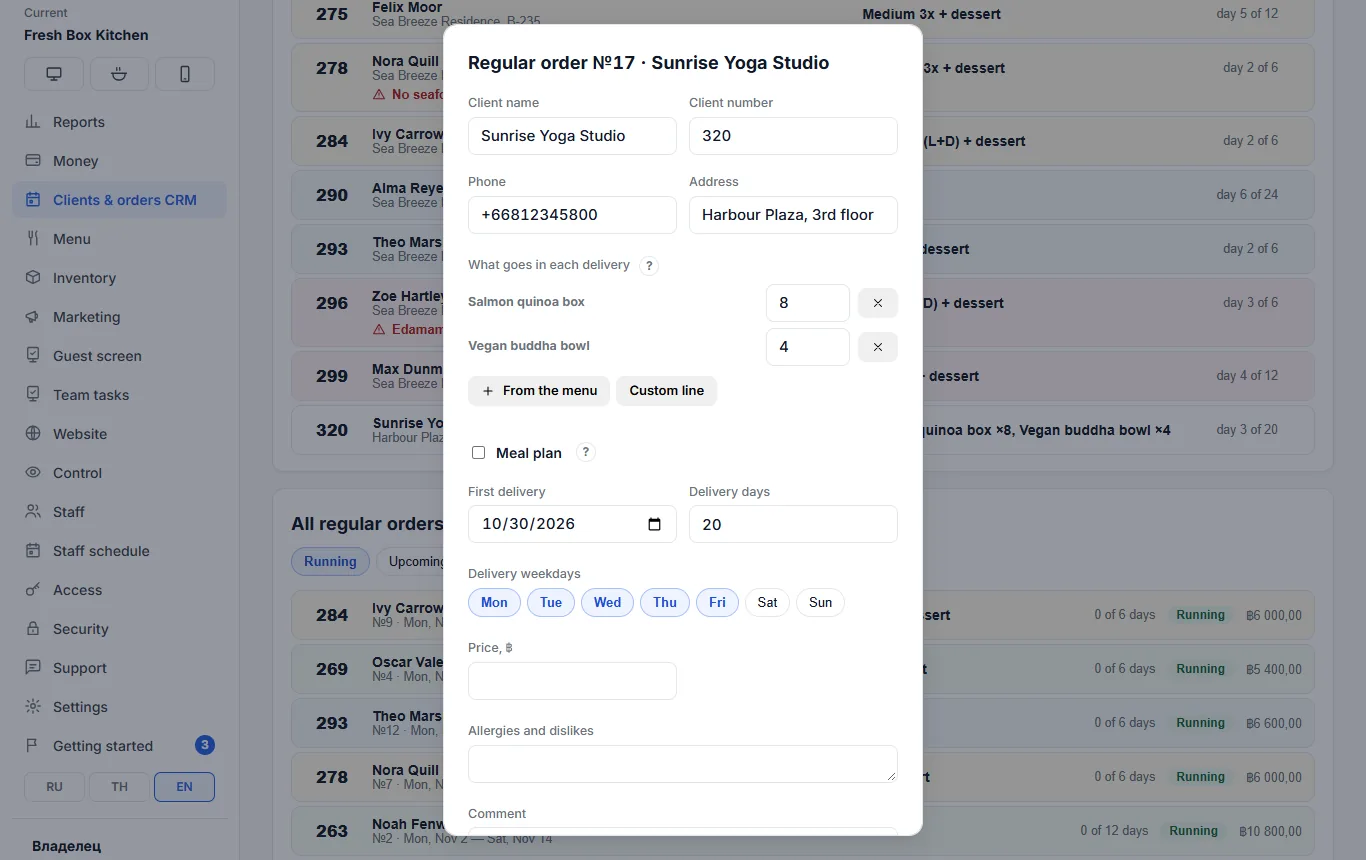
An office orders 8 boxes and 4 bowls every weekday. One regular order for the month — and every morning the kitchen sees “To prepare” in total.
Healthy meal kitchen
Meal plans: Mini, Medium, Fit and Maxi tariffs, pauses, allergies. Every morning — how many breakfasts, lunches and dinners of each tariff.
Flowers and gifts
A bouquet for every Monday, a “surprise gift” with a card, the recipient separate from the customer.
Catering
Sets for events: offers in versions, client agreement, delivery address, purchasing for all pending orders.
No client message gets lost
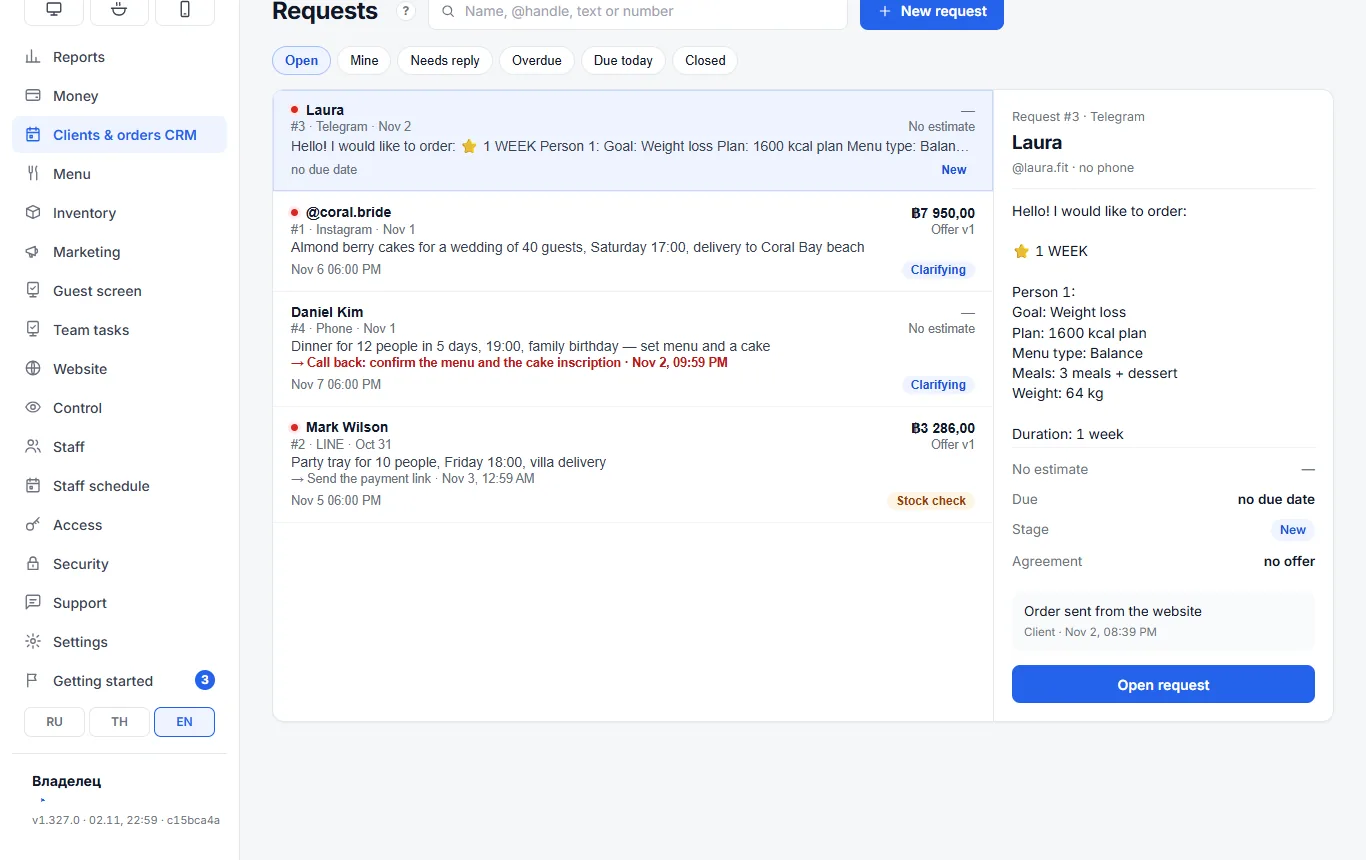
A request is an enquiry before an order: the client asked about a cake, a set or a banquet. No phone needed — an @handle is enough. A request moves through stages: New → Clarifying → Stock check → Assembly → Ready → Delivery → Closed, and is closed with an outcome: won, lost or cancelled with a reason.
- Channels: Instagram, LINE, Telegram, WhatsApp, phone, website
- Filters “Needs reply”, “Overdue”, “Due today”, “Mine” — see who to answer first
- “Next step” with a reminder in the venue’s Telegram: “call back, confirm the inscription” is not forgotten
- “Repeat” — a new request with the same client and items at current menu prices
Items from the menu, versions and a text for the client in one tap
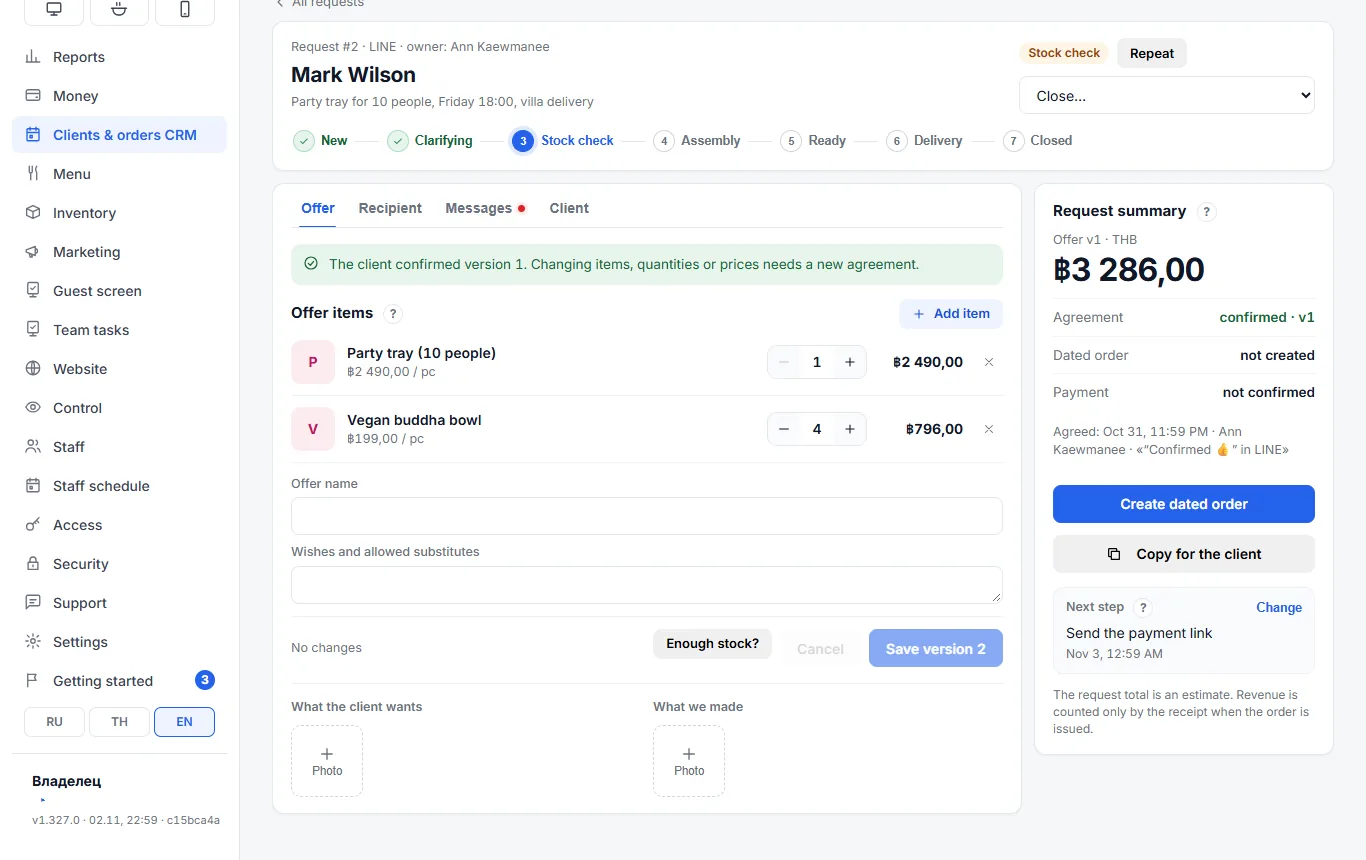
An offer is built from menu dishes with prices. Every save is a new version: v1, v2… When the client confirms, that version is agreed; changing items, quantities or prices takes a new version and a new agreement. No more “that’s not what we agreed”.
- “Copy for the client” — a ready offer text in English, Russian or Thai; once the dated order exists, with a deposit link: PromptPay, card, EX24
- Recipient separate from the customer: who, address, greeting card, “surprise gift”
- Photos of “what the client wants” and “what we made” in the request card
- “Enough stock?” — before you promise
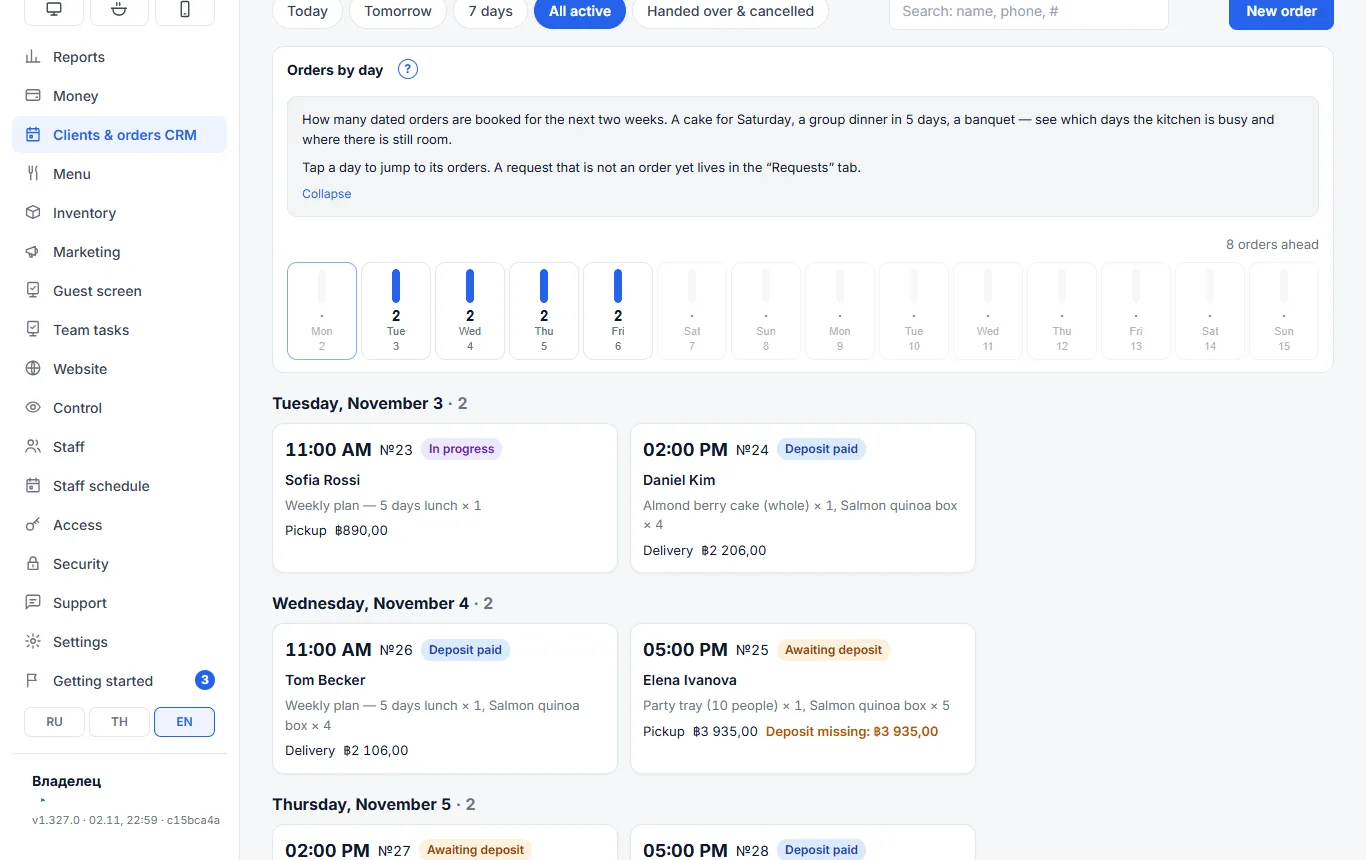
See how many orders each day has — two weeks ahead
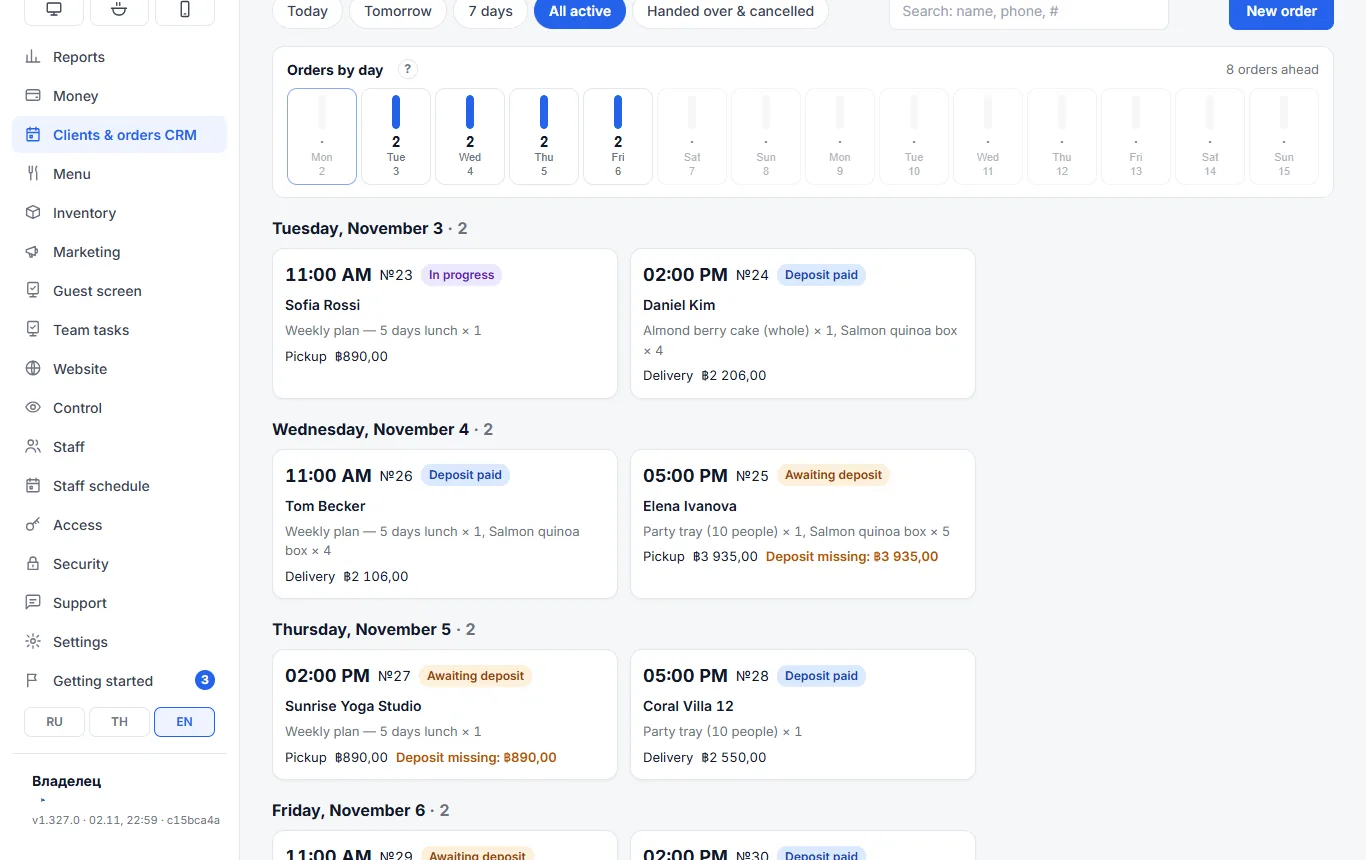
An agreed request becomes a dated order with one button: hand-over time, pickup or delivery, deposit. The “Orders by day” strip shows how many orders are already booked for each of the next 14 days; tap a day to open its orders. When you take a new order, you see straight away whether the kitchen can handle it.
- Statuses: awaiting deposit → deposit paid → in progress → ready → handed over
- “Deposit missing” in red on the order card
- Deposits can be taken with a payment link
- “To cook” and “Purchasing” for all pending orders; “enough ingredients?” before the day
Set once what to deliver every week
A regular order is what a client receives on a schedule: office lunches on weekdays, a cake for a café every Friday, flowers for Monday, coffee for an office once a week. “What goes in each delivery” — menu items with quantities or a line in your own words (“bouquet for Friday”), the weekdays and how many deliveries are paid.
- Any delivery days: Mon–Fri for an office, Friday only for a cake
- Pause “from … to …”: the remaining deliveries shift, the client gets every paid day
- Money goes through a dated order with a deposit, so revenue is never counted twice
In the morning you see what to prepare and where it goes
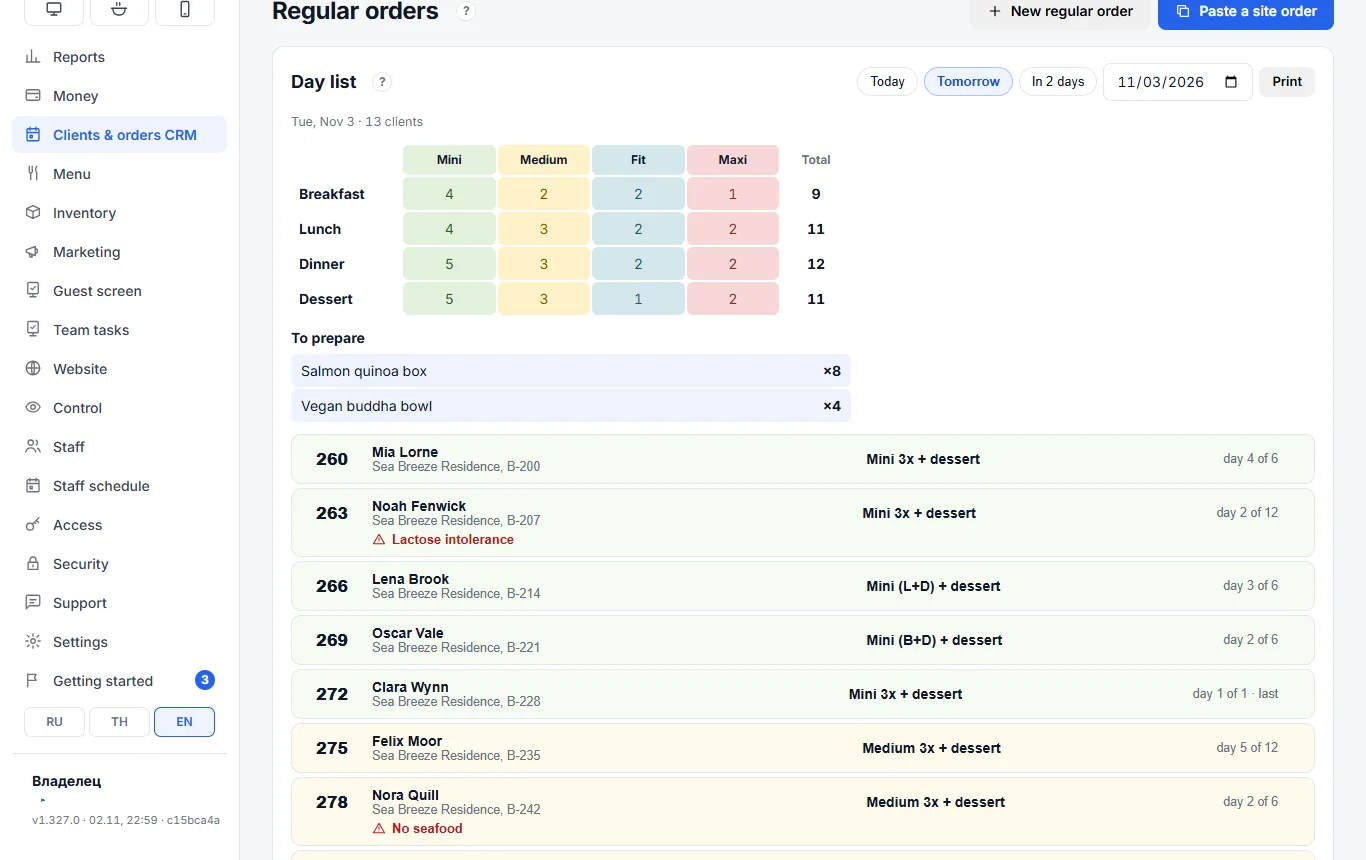
The day list for tomorrow or any date: “To prepare” in total across all orders (Salmon quinoa box ×8, Vegan buddha bowl ×4), and below it who gets a delivery: client number, address, “day 3 of 20”, allergies in red. “Print” gives a sheet for the kitchen and the courier.
- For meal-subscription kitchens — tick “Meal plan”: Mini 1200, Medium 1600, Fit 2000, Maxi 2500 kcal tariffs, meals and dessert
- Meal plans get a table of meals by tariff with totals — like the manager’s usual spreadsheet
- Cancelling requires a reason; a cancelled order can be restored
Paste the Telegram message — the meal plan is ready
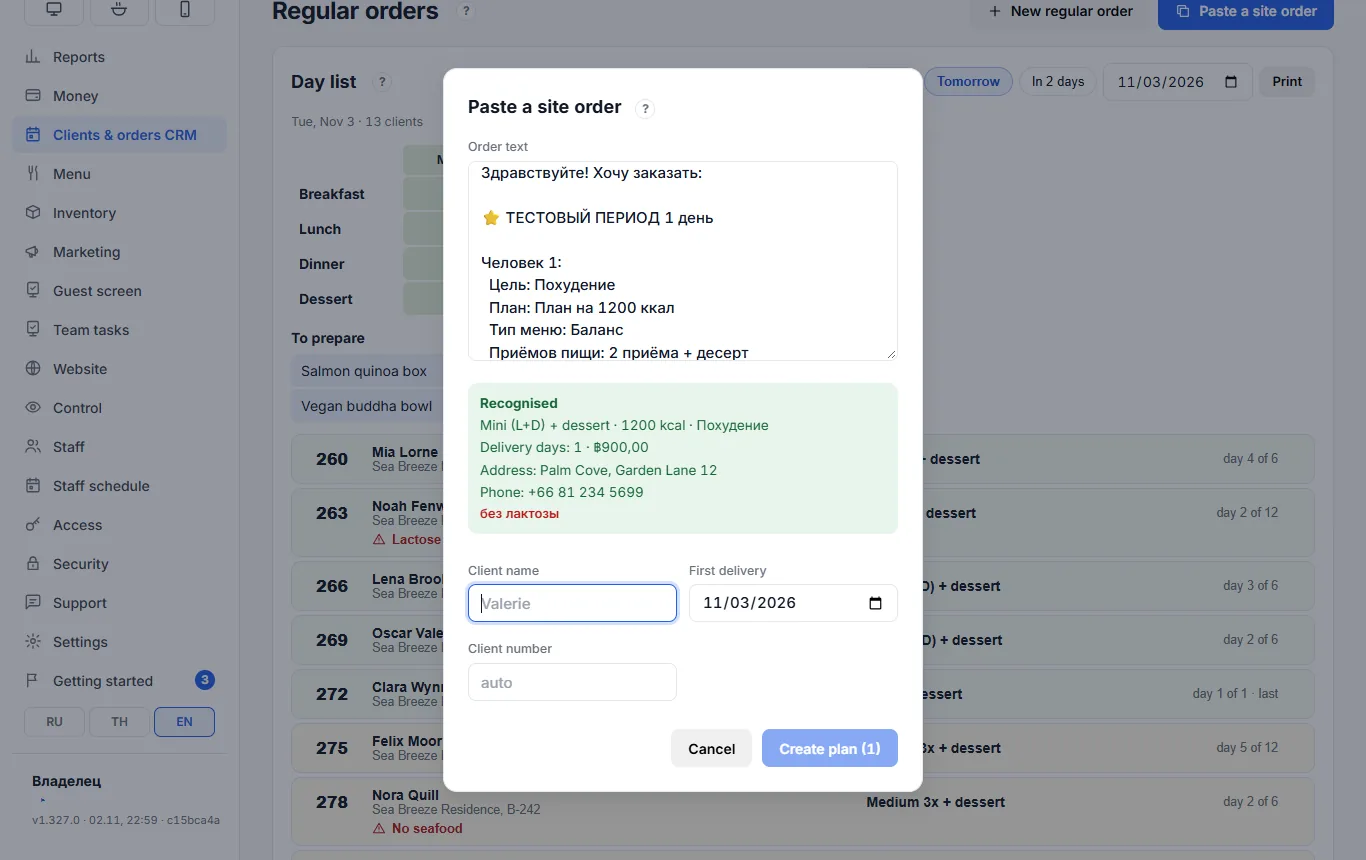
The website sends a meal plan order to Telegram as text: “1200 kcal plan, 2 meals + dessert, Lunch + Dinner, Duration, Address, Phone for courier, Allergies, To pay 900 ฿”. The manager pastes it into “Paste a site order” — tariff, meals, period, address, phone and allergies are filled in by themselves.
- Several people in one order — several meal plans
- Pasting the same order again does not create a duplicate
- A website order that came in as a request is turned into a plan with a button in the request itself
Money is counted once
Revenue only by receipt
A request total is an estimate. The dated order takes the money, and it becomes revenue when the order is handed over with a receipt.
A regular order is paid through a dated order
The money for a month of lunches or a meal plan lives in a dated order with a deposit, so it never lands in revenue twice.
Tips where you need them
A “?” icon next to every unclear block explains what it is and how to use it — no hunting through the help.
Clients & orders CRM questions
How is Clients & orders CRM different from the register?
The register sells what a guest takes right now. Clients & orders CRM is for what a client orders in advance or receives on a schedule: a cake for Saturday, a banquet, an event set, office lunches every weekday, a meal subscription. The request, agreement, deposit and dates live here, and the hand-over goes through a receipt like any other sale.
Can I use dated orders without requests?
Yes. A dated order can be created directly with the “New order” button. Requests are for when there is a conversation before the order: items, price and date are not agreed yet.
What is a regular order?
What a client receives on a schedule: office lunches on weekdays, a cake for a café every Friday, flowers for Monday. You set the menu items or a line in your own words, the weekdays and the number of deliveries — the day list builds itself. Meal-subscription kitchens get an optional “Meal plan” block with tariffs by calories.
Do I need the client’s phone number?
No. An @handle on Instagram, LINE or Telegram is enough for a request. Phone and address are asked before delivery; with a phone the request is linked to the guest card straight away.
How does the client pay the deposit?
Create a dated order from the agreed request, and “Copy for the client” adds a payment link to the offer text: PromptPay, card or EX24. You can also record a deposit by hand in the order. While it is short, the order card says so.
Does it work for healthy meal delivery?
Yes: tick “Meal plan” in a regular order — tariffs by calories, meals, pauses, allergies and a day list with a meals table you can print for the kitchen and the courier. Meal plan orders from the website are pasted as text — no retyping.
How much does it cost?
Clients & orders CRM is a separate module that works with any plan. See the price on the Pricing page. The first 14 days are free.
Try Clients & orders CRM in the demo kitchen
The demo already has requests, dated orders and regular orders of a made-up kitchen — click anything you like.