Roles and permissions
How permissions work down to a single action, access by venue, PIN and confirmations.
A permission is granted not “to a section” but to an action: see a report, apply a discount, make a refund, change a price, open a shift.
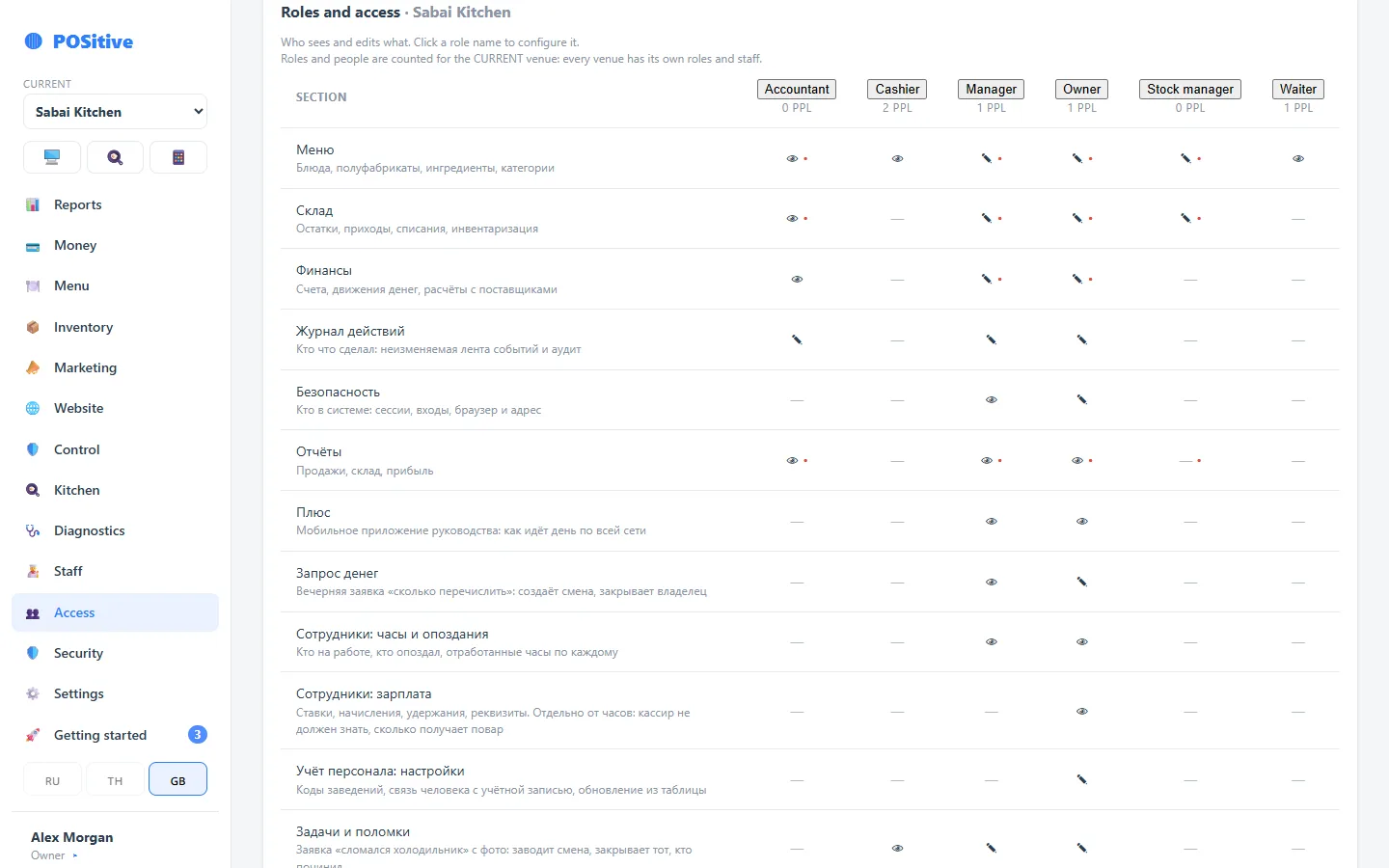
Roles
A role is a named set of permissions: waiter, bartender, administrator, manager, owner. Roles are configurable: if your administrator does not need access to finances, remove it.
What permissions exist
The list is closed: permissions are kept in a reference list, and only what is in it can be granted. The most important ones are those that guard money and other people's figures.
| Permission | What it covers |
|---|---|
| Selling and voiding an item | Working at the register and removing an item after it was sent to the kitchen |
| Discounts | Presets separately, and the manager's manual discount separately |
| Manual price | Setting an item's price by hand |
| Refund | Refunding a whole receipt or individual items |
| Opening and closing a shift | Who is responsible for the register and the cash count |
| All receipts | Seeing other people's receipts, not only one's own |
| Backdated receipt | A sale with a past date, with a reason |
| Cost | Seeing the cost and margin of dishes |
| Purchase prices | Seeing supply prices — separately from cost |
| Profit report | Seeing profit, not just revenue |
| Stock reports | Balances, usage, stock counts |
| Stock tracking | Switching stock tracking of products on and off |
| Invoice recognition | Spending the recognition allowance |
| Admin panel | Access to the administrator section at the register |
| Kitchen display | Opening the dish queue |
| Role management | Granting permissions to others — the most dangerous one on the list |
A manager usually needs the cost of a dish but not supplier prices: that is commercial information, and who sees it is decided separately from everything else.
Access by venue
A person is given access to specific locations. The manager of one location will not see the figures of the next one, even if the role has the same name.
Separately there is the account owner flag — it gives combined figures for all venues. It is easy to confuse with the “Owner” role: the role works inside a location, the flag across the whole account.
PIN and password
- PIN — the short code for signing in to the register;
- password — for signing in to the back office and “Plus”.
A cook or a dishwasher may have neither — that is normal.
Confirmation PIN
Dangerous actions (refund, manual price, closing without payment) require the PIN of an employee who has the permission. Both go into the log: who was working and who confirmed.
When someone leaves
Access is closed at once, the history of actions stays. There is no need to delete the employee — otherwise past receipts would lose their author.
A hidden button is a convenience, not protection. Even if someone gets to the interface, the server will refuse the action without the permission. That is why handing out permissions is real protection, not cosmetics.